Disclosure: This guide contains Amazon affiliate links. As an Amazon Associate I earn from qualifying purchases, at no extra cost to you. Square links are included as primary information sources and are not affiliate links.
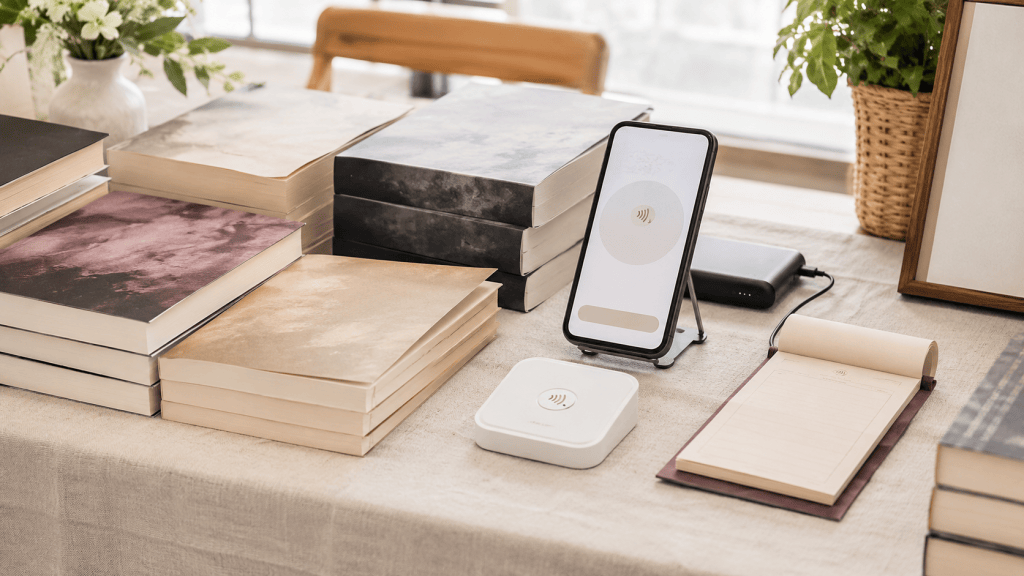
A dependable Square setup for most author events is simple: a compatible phone, the current Square Point of Sale app, a charged contactless-and-chip reader, a tested book catalog, cellular data or approved offline payments, and a backup power bank. A tablet stand, cash box, and receipt supplies are optional—not reasons to delay accepting cards.
The best time to discover a missing password, outdated app, dead battery, incorrect tax setting, or invisible book variation is not while a reader is standing in front of your table. This checklist is designed to make the first real sale boring in the best possible way.
How this Square setup guide was researched
Publish Smarter checked Square’s official hardware, setup, offline-payment, Tap to Pay, and pricing pages on September 2, 2026. We evaluated the workflow against a small author table: a few book formats, fast lines, inconsistent venue Wi-Fi, limited outlets, and one person handling both conversations and checkout.
Hands-on status: This is a researched setup guide, not a claim that every Square device and accessory was personally tested. Run the full practice transaction below with your own account, hardware, device, taxes, and receipt settings before an event.
What an author needs to take card payments
- A verified Square account with the correct business and payout information.
- A supported iPhone, iPad, or Android device with the current app.
- Square Reader for contactless and chip, or an eligible phone using Tap to Pay.
- A product catalog with each title, format, price, and tax treatment checked.
- Cellular data, dependable Wi-Fi, or properly configured supported offline payments.
- A charging cable and power bank sized for a full event day.
- A backup method for recording cash or a delayed order.
Square Reader vs Tap to Pay for authors
| Option | Best for | Tradeoff |
|---|---|---|
| Square Reader for contactless and chip | A dedicated, recognizable checkout device that accepts tap and chip | Must be charged, paired, and carried |
| Tap to Pay on iPhone or Android | Minimal hardware and an emergency backup | Needs an eligible phone and stable internet; phone is occupied during checkout |
| Square Terminal | Frequent sellers wanting an all-in-one device and printed receipts | Higher upfront cost and more equipment than many authors need |
| Magstripe reader | Backup for physical swipe cards on a compatible connector | Does not accept chip or tap payments |
The current Square contactless-and-chip reader accepts chip cards, contactless cards, Apple Pay, and Google Pay. Square says a charge lasts all day, but “all day” depends on use and conditions; charge it fully and bring power. Tap to Pay can accept contactless payments directly on an eligible phone without separate reader hardware, but Square states that Tap to Pay on iPhone requires an internet connection and does not support offline payments.
Current Square fees to budget
Square’s standard U.S. pricing page listed in-person tap, dip, or swipe payments at 2.6% plus 15 cents when checked on September 2, 2026. Manually entered and online payment methods can cost more. Plans and custom rates can change the fee, so verify your current Square pricing inside the account before setting book prices.
A $20 in-person card sale at that standard rate would produce a processing fee of about 67 cents. That is usually easier to absorb when the price was calculated intentionally rather than added as a surprise at checkout. Check local rules and your payment agreement before adding any card surcharge.
Build the book catalog before the event
- Create a separate item for each title and format.
- Use a short name you can identify while talking, such as “Aisles paperback.”
- Add current prices and confirm whether sales tax is included or added.
- Create bundles as their own items so discounts remain consistent.
- Add inventory counts if you want Square to track what remains.
- Turn on only the tipping, receipt, and customer-information prompts you genuinely need; extra screens slow the line.
Put the same prices on the table and in the app. Our author event table setup guide explains how to make books and buying information visible before a reader reaches checkout.
Prepare for bad venue Wi-Fi
Do not build the plan around public event Wi-Fi. Test cellular reception at the venue when possible, know how to use your phone’s hotspot, and check Square’s offline-payment eligibility for the exact reader and app you use. Older contactless-reader versions do not support offline payments.
Offline payments carry risk because a transaction can later be declined or disputed. Square’s current guidance says supported mobile setups should reconnect every 24 hours to continue offline acceptance, with final upload deadlines depending on the hardware. Read the current offline-payment instructions, set limits you can afford to lose, and reconnect promptly.
Useful accessories, in priority order
1. Power bank and short charging cables
Your phone is the catalog, connection, camera, communication device, and possibly the payment terminal. Power is more important than a decorative checkout stand. Choose a reputable power bank with the ports and cable types your phone and reader require, charge it at home, and keep the cable where customers cannot snag it.
2. Stable phone or tablet stand
A weighted, adjustable stand keeps the screen readable and reduces the chance of dropping it during a line. Confirm that the base fits behind your books and that the clamp or ledge works with the device case.
3. Small locking cash box or organized pouch
Even card-focused tables receive cash. Use the smallest secure system that fits the event, bring a modest change bank, separate business cash from personal money, and never leave it unattended.
The full practice-sale test
- Update the app, restart the device, and log in at home.
- Charge the phone, reader, and power bank completely.
- Turn Wi-Fi off and confirm the intended cellular or offline workflow.
- Buy one low-cost test item using the same tap or chip path a reader will use.
- Verify tax, receipt, inventory, payout record, and customer-facing business name.
- Process a refund so you know where the control is before a customer needs it.
- Reconnect and confirm any offline test payment uploads successfully.
- Pack the reader and its cable in the same labeled pouch every time.
Final author-event setup
For most authors, the current contactless-and-chip reader plus a phone and power bank is the right balance of credibility, portability, and backup options. Tap to Pay is valuable as a minimal setup or secondary path, but check device and connection requirements. Square Terminal makes more sense only when event frequency and transaction volume justify dedicated hardware.
Add this payment kit to the complete author book fair checklist, then rehearse the transaction before every major event.
Frequently asked questions
Does Square Reader need Wi-Fi?
It needs an internet path for normal processing, which can be Wi-Fi, cellular data, or a hotspot. Some supported hardware can accept offline payments under Square’s current conditions. Confirm your exact reader generation and risk before relying on that feature.
Can authors use Square without buying a reader?
Eligible iPhones and Android devices can use Square Tap to Pay for supported contactless payments. Device, software, security, and internet requirements apply, and not every card situation can be handled without hardware.
Should book prices include card-processing fees?
Build normal transaction costs into the profitability calculation for every format. Do not add a last-second fee without checking payment rules and applicable law. A clear, consistent posted price creates a better reader experience.
Square features and U.S. fees were checked September 2, 2026 and can change. Confirm current eligibility, processing rates, offline-payment rules, device support, and terms with Square.
 Publish Smarter